
Real Guitar: acoustic electric
Kolb AppsMusic
4.37.36K Reviews
- Version
- 8.38.10
- Installs
- 50.00M
- Age Rating
- Everyone
Screenshots

Our Review of Real Guitar: acoustic electric
 Analysis by Appyee
So, I’ve been fiddling around with this app called Real Guitar: acoustic electric and, let me tell you, it’s been quite the musical adventure. Whether you're a seasoned guitarist or just someone who loves to strum a few chords, this app has a little something for everyone. Let’s dive into what makes this app a hit and where it might hit a few flat notes.
In practical terms, I see it as a pocket-sized way to explore chord shapes and make quick musical sketches, rather than a substitute for the feel and feedback of a real guitar. That distinction matters: tapping a screen is convenient when an instrument is out of reach, but it won’t build the same finger strength or picking control as regular practice on strings.
A useful place to start, and a sensible routine
My most reliable approach is to begin with a simple goal: choose a chord progression, play it slowly, and listen for whether each change lands cleanly. Once that feels familiar, I can try a steadier rhythm or experiment with a different sound. Keeping the task small makes the app more useful than jumping between every option at once.
For example, if I have a few minutes during a commute or while waiting for dinner, I can work through a progression I already know instead of trying to learn a whole song on a phone screen. A repeatable routine—same progression, relaxed tempo, then one small variation—helps me notice musical ideas without pretending that a brief session replaces instrument practice.
It is also handy when I want to test whether a chord sequence sounds the way I imagine it. I can move between shapes, listen to the harmony, and save an idea through the recording option described below. That is a modest but worthwhile use: capturing a sketch before I forget it, not producing a polished demo.
The Interface: A Guitarist’s Playground
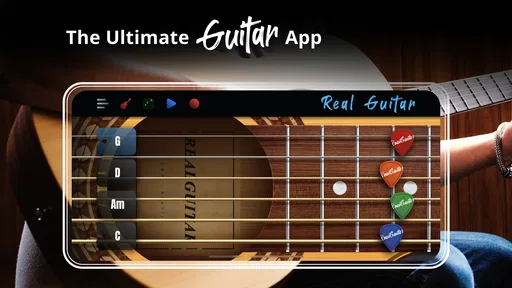
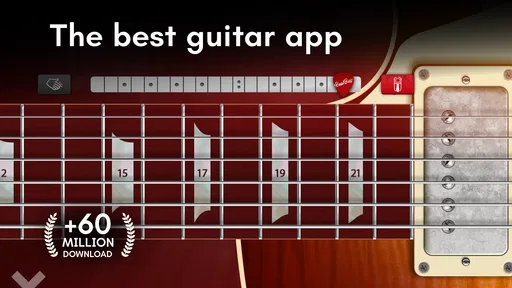
First off, the interface of Real Guitar: acoustic electric is super intuitive. When you open the app, you’re greeted with a realistic-looking guitar fretboard that’s just itching to be strummed. It’s designed to mimic the feel of a real guitar, so you can tap and slide your fingers across the screen just like you would on an actual instrument.
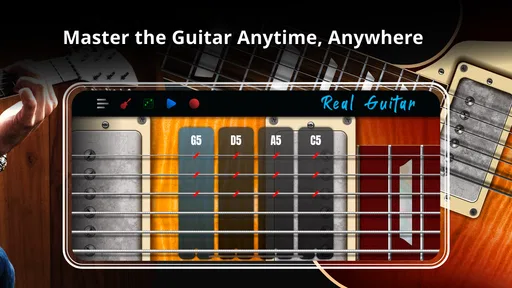
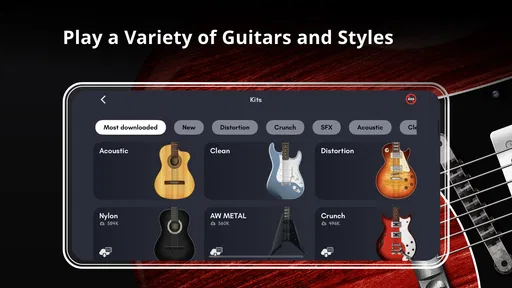
What I love is how everything is laid out. The buttons for switching between acoustic and electric guitars are right there, making it a breeze to switch up your sound. Plus, the app has this really cool feature where you can adjust the chord library to suit your style. Talk about customization!
That layout makes a difference when I am using the app casually: I can focus on the chord or sound I am testing instead of spending the whole session searching through menus. I would still treat a touchscreen fretboard as its own instrument. Finger placement and timing translate only partly to a physical guitar, so I use it to explore ideas and reinforce recognition, not to judge how my hands will perform on strings.
Settings worth checking before a longer session
Before settling into a practice run, I check the sound level and make sure the selected guitar suits what I am trying to hear. A softer acoustic tone is often easier for comparing chord changes, while an electric sound can make a riff feel more vivid. I avoid turning the volume up too far: loud playback can be tiring, and the electric sound may distort when pushed, as noted below.
The chord library is another place to make a deliberate choice. Rather than browsing at random, I narrow the session to a few shapes that belong together. That keeps the screen from becoming a distraction and gives me a clearer ear for transitions. If I am learning, I stick with familiar chords first; if I am composing, I use the library to test less obvious combinations.
Sound Quality: It’s All in the Strum
Let’s talk about the sound, because that’s what really matters, right? I was pleasantly surprised by how authentic the guitar tones were. The acoustic guitar has this warm, rich sound that’s perfect for strumming along to your favorite tunes. On the electric side, there’s a nice range of effects that can give your playing some serious edge.
One thing that really stood out to me was the app’s ability to maintain sound quality even when you’re playing fast. The notes don’t get muddled, which is a huge plus. It really feels like you’re playing a real guitar, minus the sore fingers!
For quick musical checks, this clarity is more important than trying to imitate every detail of a physical instrument. I can hear whether a chord sounds bright or mellow and whether a repeated pattern is holding together. But if I need the natural dynamics of picking softly and then digging in, a real guitar—or a suitable instrument app built around nuanced performance—will serve me better.
Features That Hit the Right Note
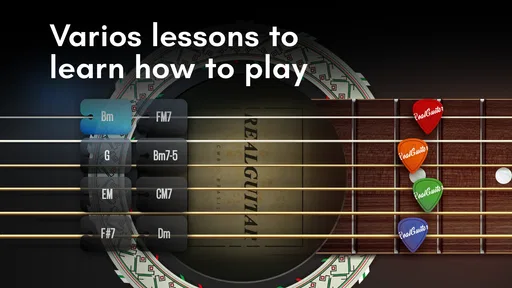
Now, let’s chat about some of the features that make this app a keeper. First up, the chord library is incredibly comprehensive. Whether you’re into pop, rock, or jazz, you’ll find the chords you need to jam out.
"The app even includes a tuner and metronome, which are absolute lifesavers for keeping your playing on point."
Another feature that’s a total game-changer is the recording option. You can lay down tracks and listen back to them, which is perfect for tracking your progress or just showing off to your friends. And if you’re feeling competitive, there’s a multiplayer mode where you can challenge your friends to a guitar duel. Who doesn’t love a little friendly competition?
For a more repeatable workflow, I use recording as a quick memory aid: play the same short phrase twice, listen back, then decide what to change next. That makes it easier to catch a chord that arrives late or a rhythm that feels uneven. I would not mistake a phone recording for a full production setup, but it can answer the immediate question, “Does this idea work?” without extra gear.
The metronome is most useful when I resist the urge to speed up too soon. I start at a pace where chord changes feel comfortable, then increase the challenge only after the pattern sounds steady. This is a practical way to build timing awareness, although it cannot teach the touch and coordination needed to fret and strum real strings.
Faster patterns without turning practice into button-hopping
Once a progression is familiar, I get more value by changing one thing at a time: keep the chords, alter the rhythm; keep the rhythm, swap the guitar sound; or repeat a short phrase and compare the recordings. That simple constraint makes experiments easier to evaluate. Constantly switching settings can be fun, but it also makes it hard to tell which change improved the result.
A useful everyday example is having a song idea arrive when I am away from my guitar. I can sketch the chord order on the virtual fretboard, try a couple of strumming patterns, and record the version I want to remember. Later, I can transfer the idea to a real instrument and work on the parts a touchscreen cannot reproduce. For a beginner, the same habit can make chord names and progressions feel less abstract.
Learning Curve: Easy as Pie
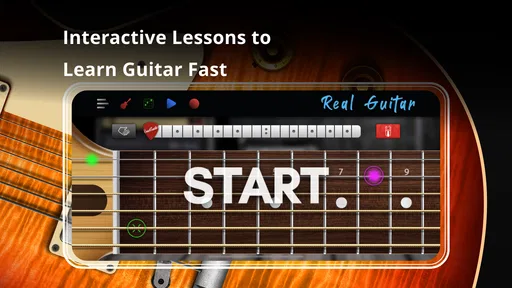
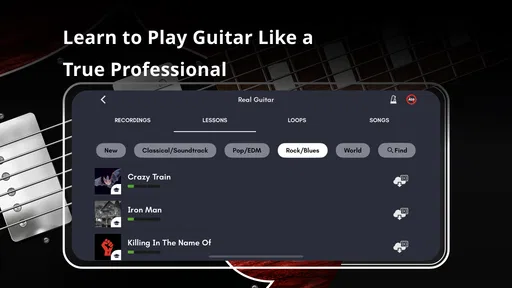
If you’re worried about a steep learning curve, don’t be. The app has a built-in tutorial that walks you through the basics, so even if you’re a total newbie, you’ll be playing your first song in no time. The tutorial is easy to follow, with clear instructions and visuals to guide you along the way.
For those who are more advanced, there are plenty of lessons and exercises to keep you challenged. You can even slow down the tempo to really nail those tricky passages.
I would especially recommend starting with the tutorial if you are new to guitar terminology. It gives you a more guided entry than simply staring at a fretboard and guessing where to tap. After that, the best use of lessons and exercises is focused practice: choose one thing to improve, repeat it, and listen critically rather than treating completion as proof that the skill has transferred to a physical instrument.
Where it fits among guitar apps—and where it does not
Compared with a conventional guitar-learning app, this one feels more immediate because the central experience is playing a virtual guitar. That is appealing when I want to explore chords or make noise right away. A structured course can be a better choice if I need a carefully staged curriculum, feedback on my hand position, or a firm plan for progressing on a real instrument.
Compared with simply watching a lesson or looking up chord diagrams, the interactive fretboard gives me a way to hear a shape as I try it. The trade-off is that a touchscreen does not provide the physical resistance, string separation, or tactile cues of a guitar. I would choose this app for quick exploration and light practice, but choose an actual guitar and hands-on instruction for technique, endurance, and expressive control.
It is also not the right fit for someone whose main aim is detailed recording or a realistic electric-guitar performance workflow. Its strengths here are accessibility and experimentation, not replacing dedicated music-making tools. I find that expectation keeps the app enjoyable instead of disappointing.
Room for Improvement
As much as I love this app, it’s not without its quirks. Occasionally, the app can be a bit laggy, especially if you’ve got a lot of apps running in the background. Also, while the sound quality is generally top-notch, it can sometimes get a bit distorted when you crank up the volume on the electric guitar.
Another thing to keep in mind is that some of the cooler features, like certain guitar effects and lessons, are locked behind a paywall. It’s not a deal-breaker, but it’s something to consider if you’re on a budget.
The practical fix for a sluggish session is to close other apps and keep the exercise simple, rather than expecting rapid, elaborate playing to feel identical on every device. I also keep the volume at a comfortable level and make a short test recording before relying on a sound for an idea. Those habits do not remove the limitations, but they help me avoid confusing a playback issue with a playing mistake.
The game is free to start, while optional in-app purchases range from $1.99 to $18.99 per item. I would explore the basic experience before spending anything and only consider a purchase if a particular locked effect or lesson clearly suits how I use it. That makes the cost decision personal rather than treating every extra as essential.
Who will get the most from it
I think it is a good match for curious beginners, casual players who want a guitar-like outlet on a phone, and guitarists who need a quick way to test chord ideas when their instrument is not nearby. Its Everyone age rating also makes it approachable for a broad audience, though younger players will still benefit most from a patient adult or teacher when learning real technique.
I would steer away from it if you expect the screen to teach accurate fretting mechanics by itself, need precise performance feedback, or want a full recording environment. In those cases, a physical guitar, a lesson-focused tool, or a more specialized music production app is a better use of your time. The strongest recommendation I can give is conditional: use this as a convenient companion, not as proof that you no longer need the instrument you are trying to learn.
Final Strum: Is It Worth Downloading?
All in all, Real Guitar: acoustic electric is a fantastic app for guitar lovers of all skill levels. Whether you’re looking to learn, practice, or just have some fun, this app has something for you. It’s user-friendly, sounds great, and offers plenty of features to keep you entertained.
Kolb Apps’ music game has been around since Jun 11, 2012, and its current version is 8.37.5, with support for Android 7.0 and up. Its 4.3 average comes from around 382,000 ratings, and it has over 50 million installs, which gives it a large audience without making it the right fit for every player. For me, those details sit behind the more important question: do you want a quick virtual guitar to explore, or a tool for learning the physical instrument?
If you’re serious about your guitar practice or just want to have a virtual guitar at your fingertips, I’d say give it a shot. Just be prepared to get a little addicted to jamming out on your phone!
My verdict is that it is worth trying if convenience is the point: a spare few minutes can become a chance to review chords, test a progression, or save a musical thought. If your goal is developing touch, timing on strings, and confident live playing, pair it with a real guitar rather than asking the screen to do that job. Used with that expectation, it is an enjoyable little practice companion instead of a substitute it was never meant to be.
Privacy and Permissions
See what permissions an app requests and how it handles your data.
- Photos/Media/Files
- read the contents of your USB storage, modify or delete the contents of your USB storage
- Storage
- read the contents of your USB storage, modify or delete the contents of your USB storage
- Microphone
- record audio
- Wi-Fi connection information
- view Wi-Fi connections
- Other
- view network connections, full network access, change your audio settings, run at startup, control vibration, prevent device from sleeping, Google Play license check, read Google service configuration
Verdict
Strengths of Real Guitar: acoustic electric
- Highly realistic sound quality.
- Intuitive user interface.
- Wide range of guitar types.
- Customizable chord library.
- Offline mode available.
Limitations of Real Guitar: acoustic electric
- Ads can be intrusive.
- Limited free features.
- Requires storage space.
- Occasional app crashes.
- No advanced tutorial mode.
Other Releases by Kolb Apps
View All
Real Drum electronic drums set
Music4.5

Classic Drum: play drums
Music4.6

Real Piano electronic keyboard
Music4.5

Real Bass electric bass guitar
Music4.5
Similar Picks in This Category
View All
Tiles Hop Music & Ball Game
AMANOTES PTE. LTD.4.3

Magic Tiles 3™ - Piano Game
AMANOTES PTE. LTD.4.6

Real Piano
Bilkon3.7

Piano Game: Classic Music Song
Dream Tiles Piano Game Studio4.0

Smash Colors: Music Ball Rush
BADSNOWBALL HONGKONG LIMITED4.2

Piano Music Go-EDM Piano Games
Joy Journey Music Games4.5
Frequently Asked Questions
What features does Real Guitar: Acoustic Electric offer?
Real Guitar: Acoustic Electric provides a comprehensive virtual guitar experience, offering both acoustic and electric guitar modes. It includes a wide range of chords and riffs, customizable tuning options, and a variety of sound effects. Users can also access a library of songs to practice and play along with, making it suitable for both beginners and advanced players.
Is Real Guitar suitable for beginners?
Yes, Real Guitar is designed to be user-friendly for beginners. It offers tutorials and a built-in chord library to help new users learn basic chords and strumming patterns. The intuitive interface and adjustable difficulty levels make it easy for novices to start playing and gradually improve their skills.
Can I use Real Guitar without an internet connection?
Real Guitar: Acoustic Electric can be used offline, allowing you to practice and play anywhere without needing an internet connection. However, to access certain features like downloading new songs or updates, you will need to connect to the internet. This makes it versatile for both home and on-the-go use.
What devices are compatible with Real Guitar?
Real Guitar: Acoustic Electric is available on both Android and iOS platforms. It is compatible with a wide range of devices, including smartphones and tablets. Users should ensure their device meets the app’s minimum operating system requirements to ensure optimal performance and access to all features.
Are there in-app purchases or ads in Real Guitar?
Real Guitar offers a free version with ads and optional in-app purchases. These purchases can enhance the user experience by unlocking additional features, such as premium sound packs or ad-free usage. While the app provides a robust free experience, some users may prefer the extended functionalities available through these purchases.
Play our best games!


